
YAMMI
ABOUT
Japanese convenience stores struggle to differentiate and - open 24/7 - find it difficult to recruit and retain staff: labour is at a premium. At lunchtimes the stores are overwhelmed by customers queuing for bento and rice; others turn away, deterred by the crowds.
APPROACH
Working with a rapid prototyping and iterative process helped us validate a proposition that not only alleviate the workload and stress of store managers and staff at lunchtime, but also benefits 7-Eleven customers who save previous time on their break.
We built Yammi, a working app prototype, in less than two weeks and were able to test and iterate it over three scaled rounds of testing in Tokyo and Yokohama with 7-Eleven customers.
SOLUTION
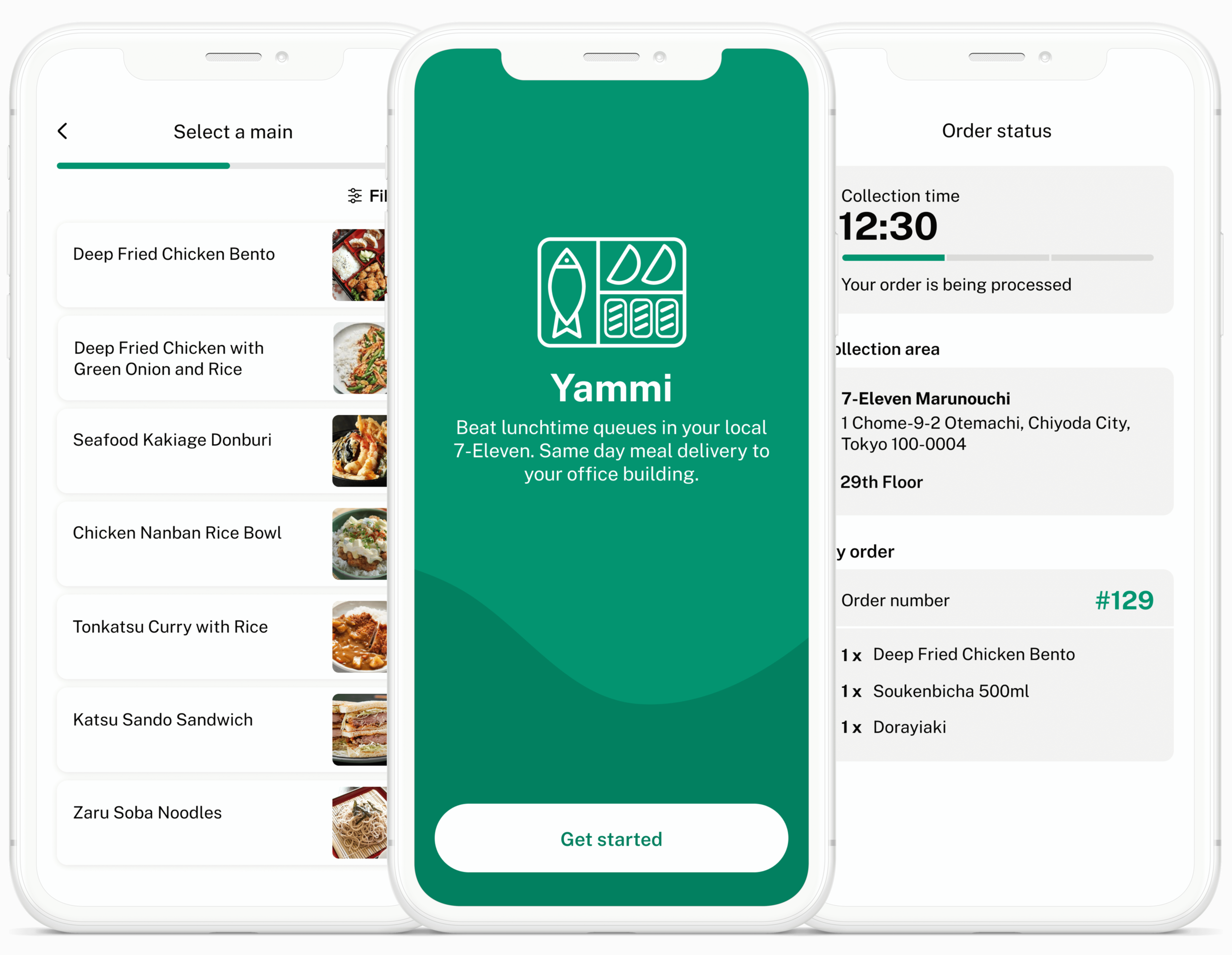
We built a pre-order app prototype with in-app payment: a customer picks a collection slot, chooses 3 lunch items as part of a meal deal and gets notified when it’s ready to collect.
Working with local franchisee managers we prototyped the entire customer experience and operational fulfilment for pick-up in a city centre store in Tokyo’s financial district.
PROJECT DETAILS
YEAR: January — March 2020
INDUSTRY: Retail
MY ROLE: Service Design, UX Research, App and In-Store Prototyping, UX/UI Design
TEAM: Lead Designer (me) | Researcher | Product Manager | 1 Full Stack Engineer
PLATFORM: iOS (React Native)

Interviewing Franchisees
A previous phase of work - led by a different Made by Many team - had focused on interviewing and generating insights from convenience store customers. Taking over the project, we realised we still had lots to learn about the industry and more specifically about 7-Eleven franchisees and store staff.
We wanted to learn about franchisees’ typical day running a convenience store, their struggles and the type of support they need to thrive in the challenging world of Japanese convenience stores.
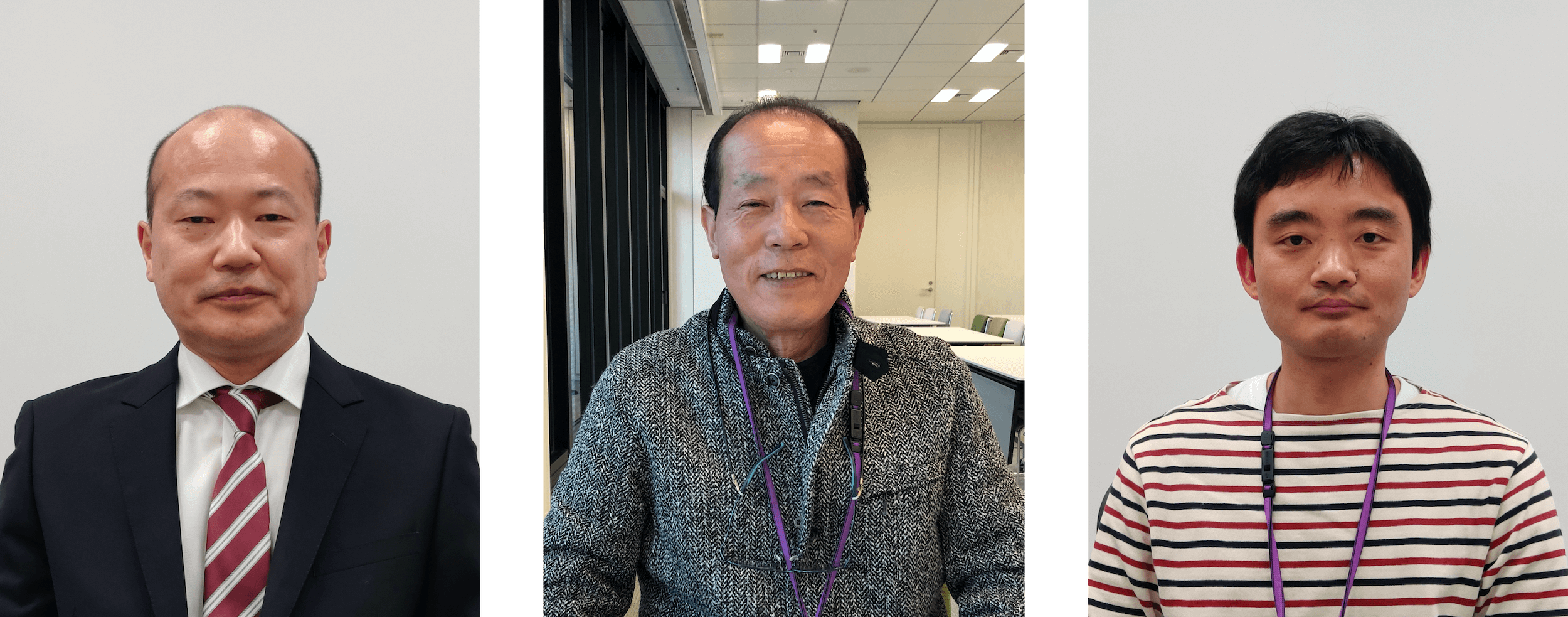
Three of the franchisees we interviewed
The Ideal Convenience Store Experience
We talked to a larger group of customers and asked them to imagine about their daily routine when visiting convenience stores, the things they usually buy at different times of the day and what makes them want to shop in convenience stores.
We also ask customers about their ideal store experience using LEGO Serious Play activities. Most of them imagined stores without queues, supported by digital tools they could use to order items and pay upfront.

Prototyping and Testing
Based on research insights, I designed a clickable prototype that mocks up a lunchtime meal order and pick-up service that helped us test the following hypothesis with franchisees and customers:
A delivery service can help relieve franchisees at peak times.
A delivery service can appeal to Japanese customers - how is food delivery in a corporate setup perceived in Japan?
Customers would rather order their lunch in advance and pick it up when it’s ready to collect, using a fast track lane in-store.
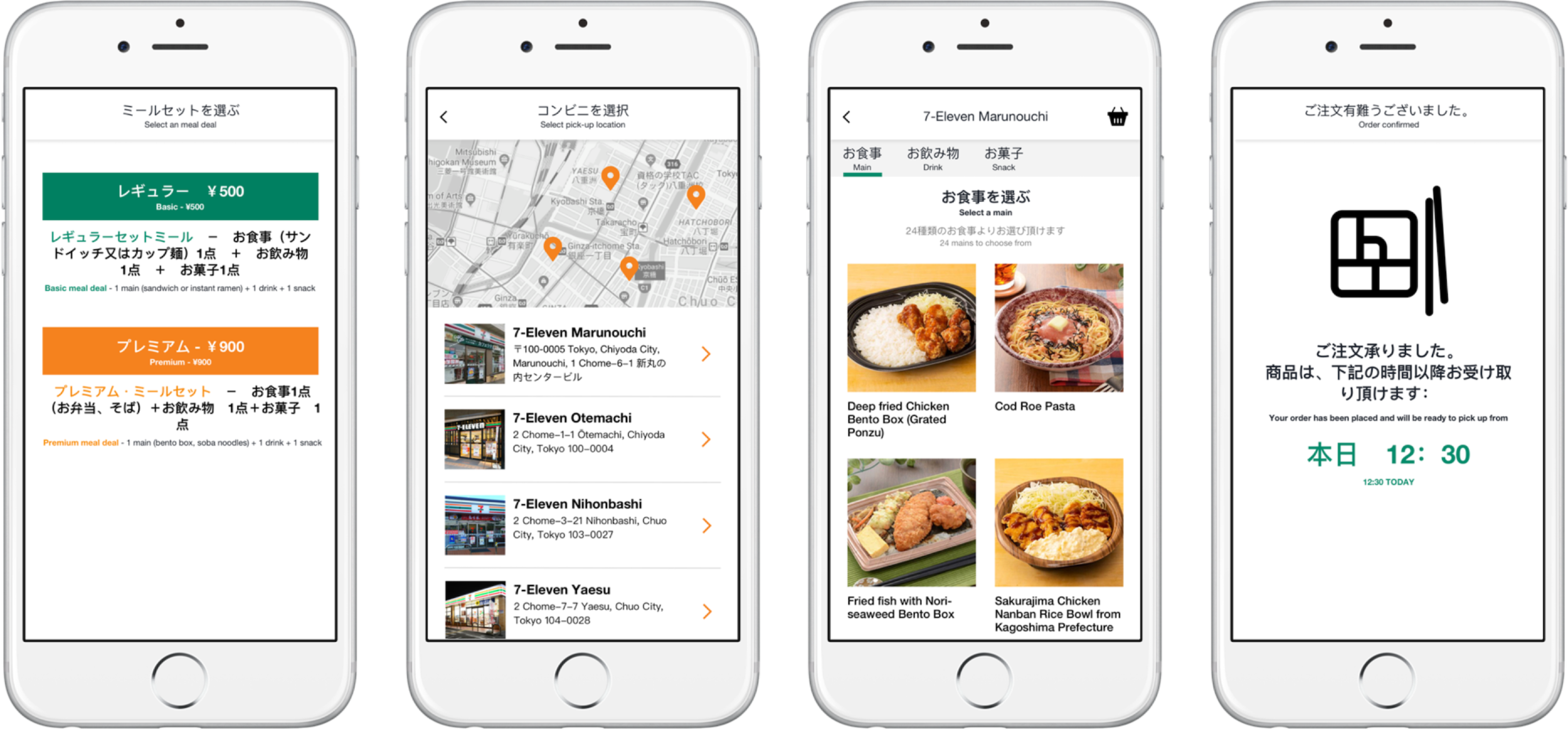
Clickable prototype in japanese—tested with 7 Eleven customers and franchisees
Research Findings
The app should only offer customers best sellers items as it would help franchisees manage stock and reduce waste.
The meal deal should cost ¥700 - ¥750 as franchisees think customers would see value in a set meal for a set price.
Food delivery in a Japanese corporate environment is perceived as awkward and most customers wouldn’t feel comfortable getting their order delivered to their office.
Value Proposition
A streamlined pre-order food service that allows users to select a pickup time, choose any three lunch items for a set price of ¥700, pay in-app, and receive a notification as soon as their order is ready.
To be able to test in the most realistic context we had to consider the relationship between different parts of the service (pick-up in-store, staff’s role, physical store, food stocks and temperatures, delivery location in office building…).
I created service blueprints for order pick-up in-store and pick-up from a dedicated area in the office building to help with the first round of testing the app prototype in a spacial environment.
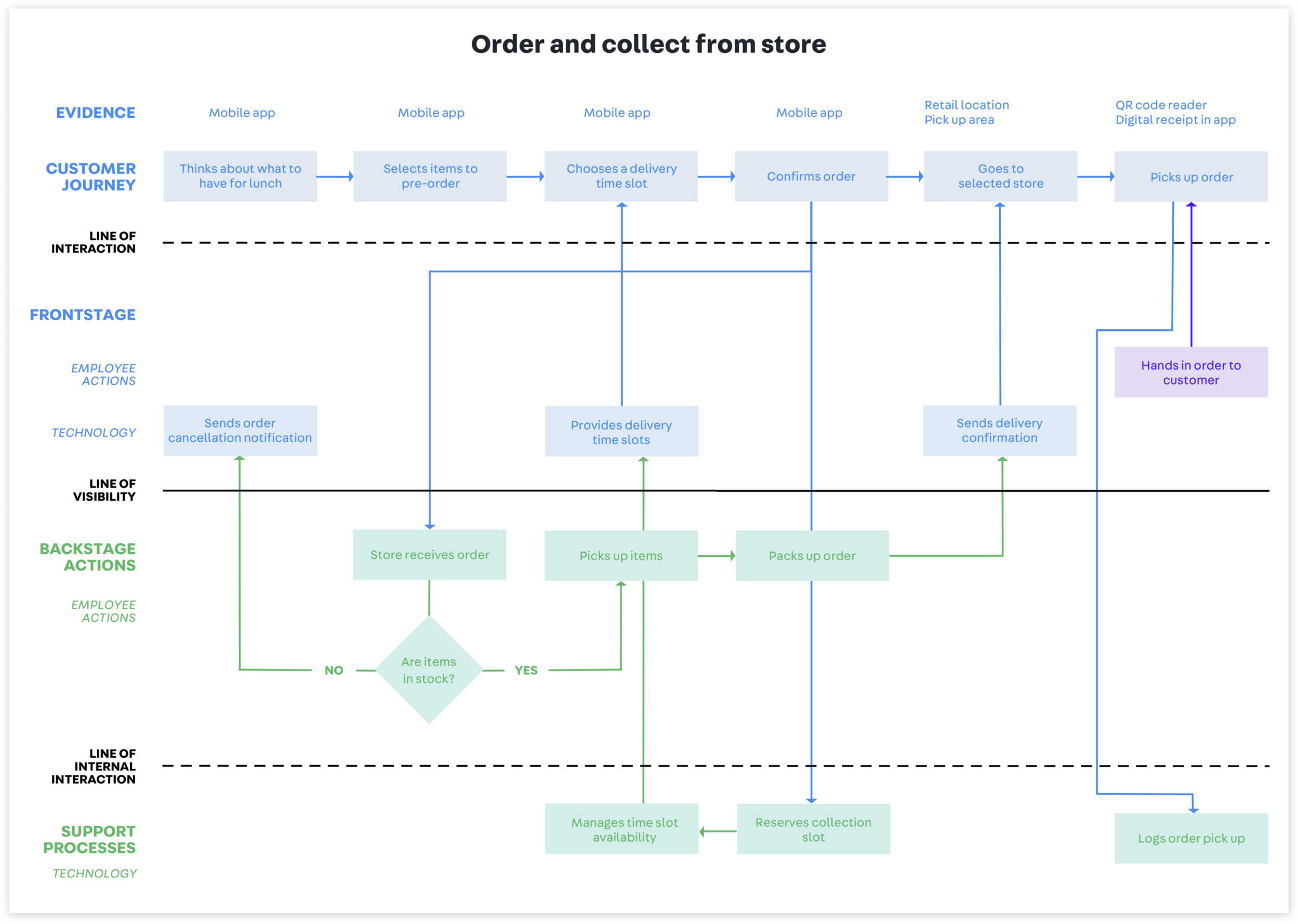
Service Mapping
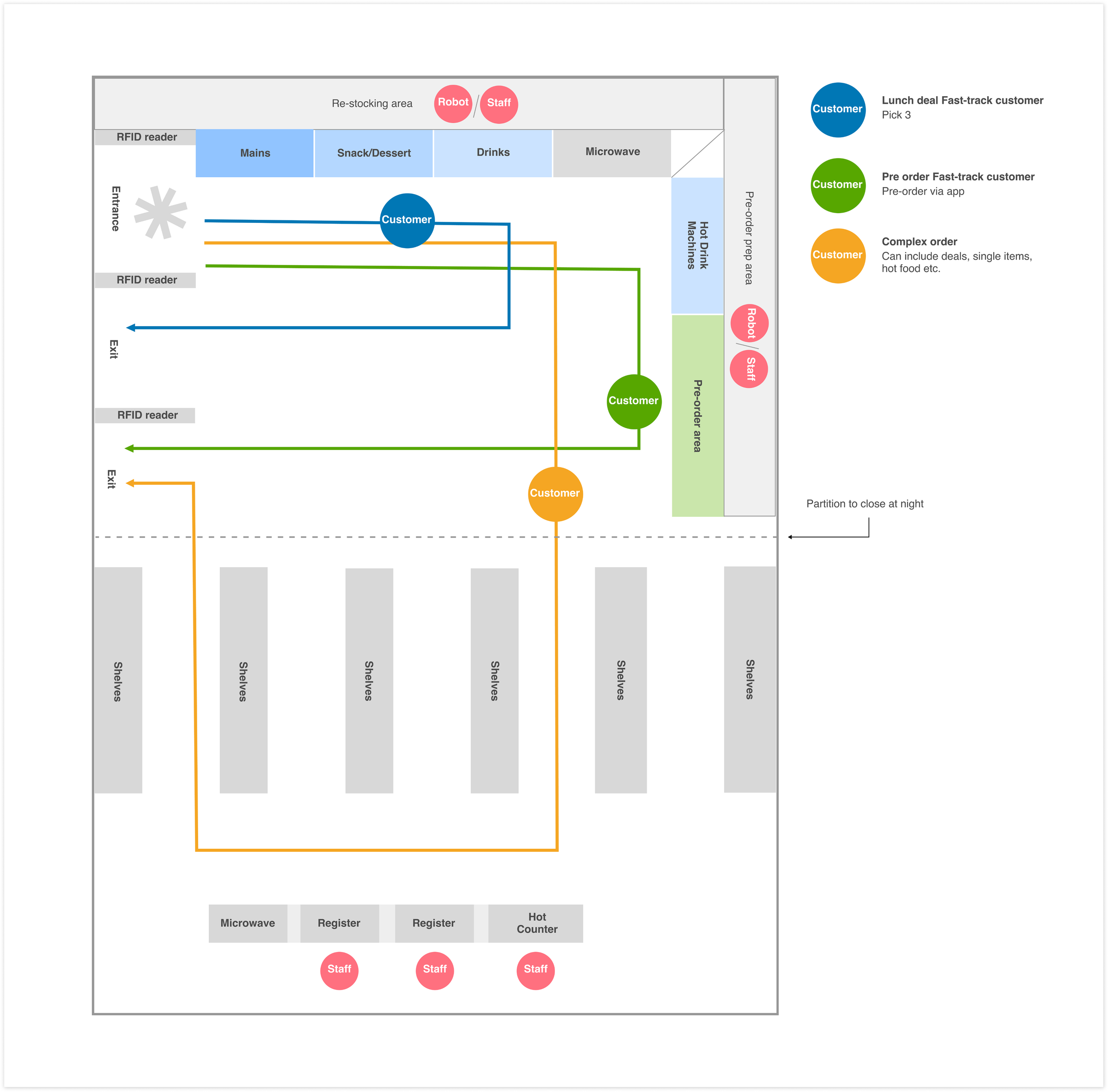
Store Diagram
The goal was to map out the optimal physical store layout so customers who pre-ordered can quickly pick up their items and leave, while walk-in customers can still browse the store without interruption. The store diagram helped us visualize how people would move through the space and how product and service touchpoints should be organized.
The store diagram shows the placement of key zones—entrances, pickup counters, aisles, product displays, and checkout—in relation to customer movement. It highlights how the store can support two (or more) parallel customer journeys: fast pickup and regular browsing.
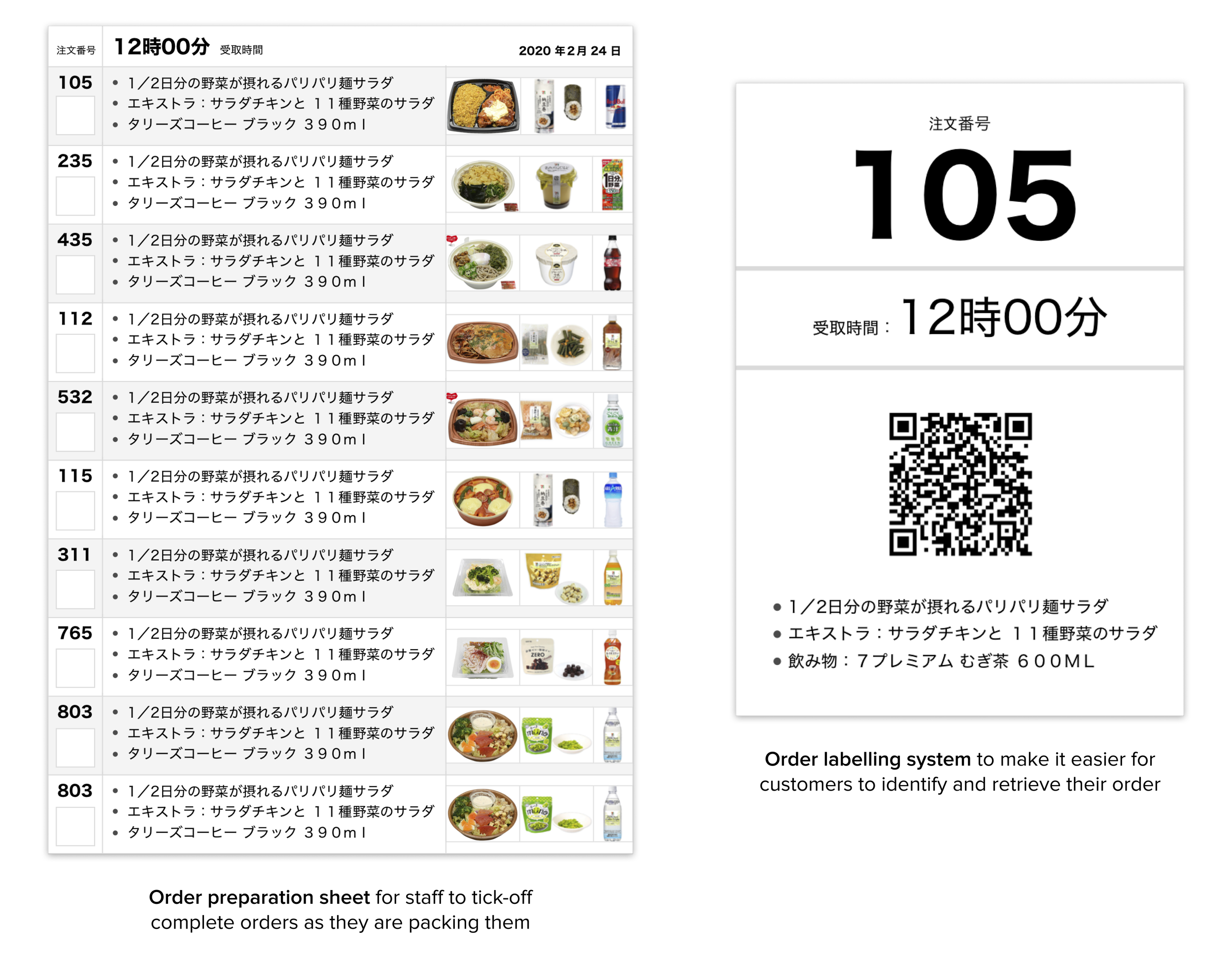
Designing Testing Assets
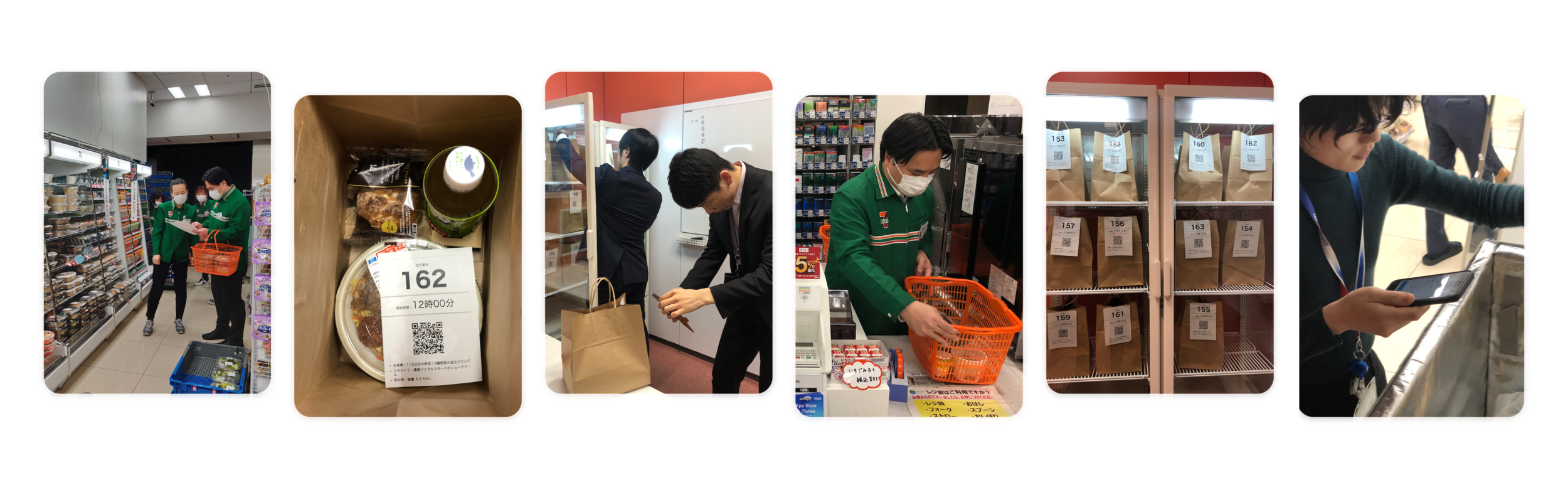
I designed a preparation sheet and the customer-facing label—which are designed to support both sides of the service in-store:
For staff (backstage):
Clear batching system
Visual product references
Tick-off workflow
Reduced packing errors
For customers (front stage):
Fast, self-serve pickup
Zero confusion when identifying orders
Smooth, low-interaction store experience
Together, these assets would improve operational efficiency and help ensure that the pre-order service delivers on speed, clarity, and reliability—key aspects of the expected experience.
App prototype
After completing multiple rounds of interviews and testing our clickable prototype, we decided to scale testing and to build our first coded prototype.
We ran three tests of increasing size and fidelity in real stores, making operational improvements and refining the app prototype experience each time.
Note: the app prototype is shown here in English but was tested in Japanese with Japanese speaking users.
We quickly learned that the user experience had to be fast and simple enough that customers could place an order in about 2 - 3 minutes every morning while commuting on a busy Tokyo train.
Customers first select a collection time slot, choosing from the slots available that day (logistics of pick-up and delivery influence time slots).
Notified by a notification that the order is ready, they would then make their way to the designated store to pick it up.
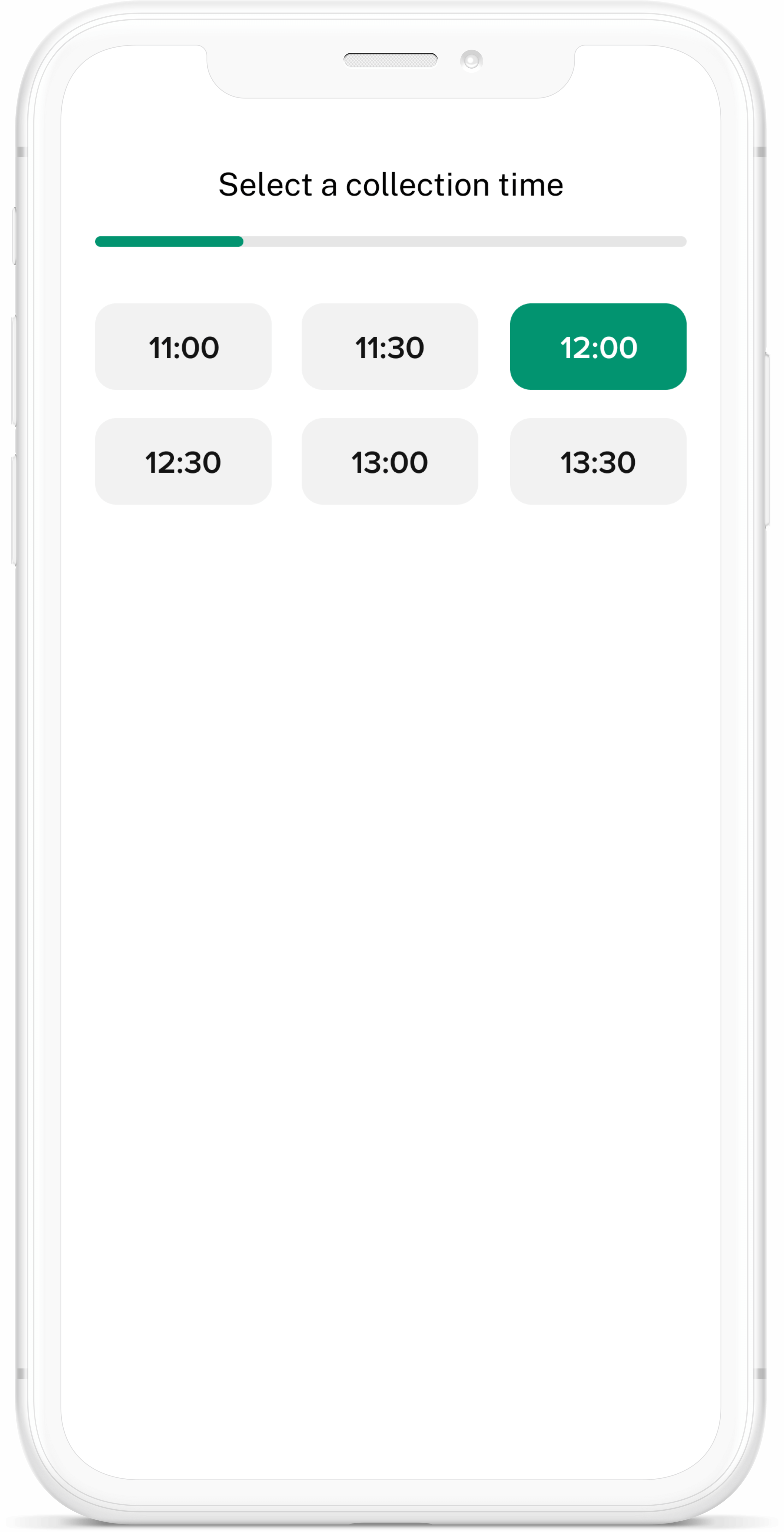
Selecting the Order Pick Up Time
Providing Accurate Stock Data
One of the challenges of this project was to not have access to a global 7-Eleven stock database. For our scaled tests with customers, we had to make sure that the items available in the app would also be available from the two shops we partnered with in Tokyo and Yokohama.
Working closely with these two stores, we were able to get access to their stock data for each of the days we tested the app with customers. We also did a lot of work to narrow down the offering to a manageable number of items available in the app (a typical 7-Eleven store sells hundreds of food items).
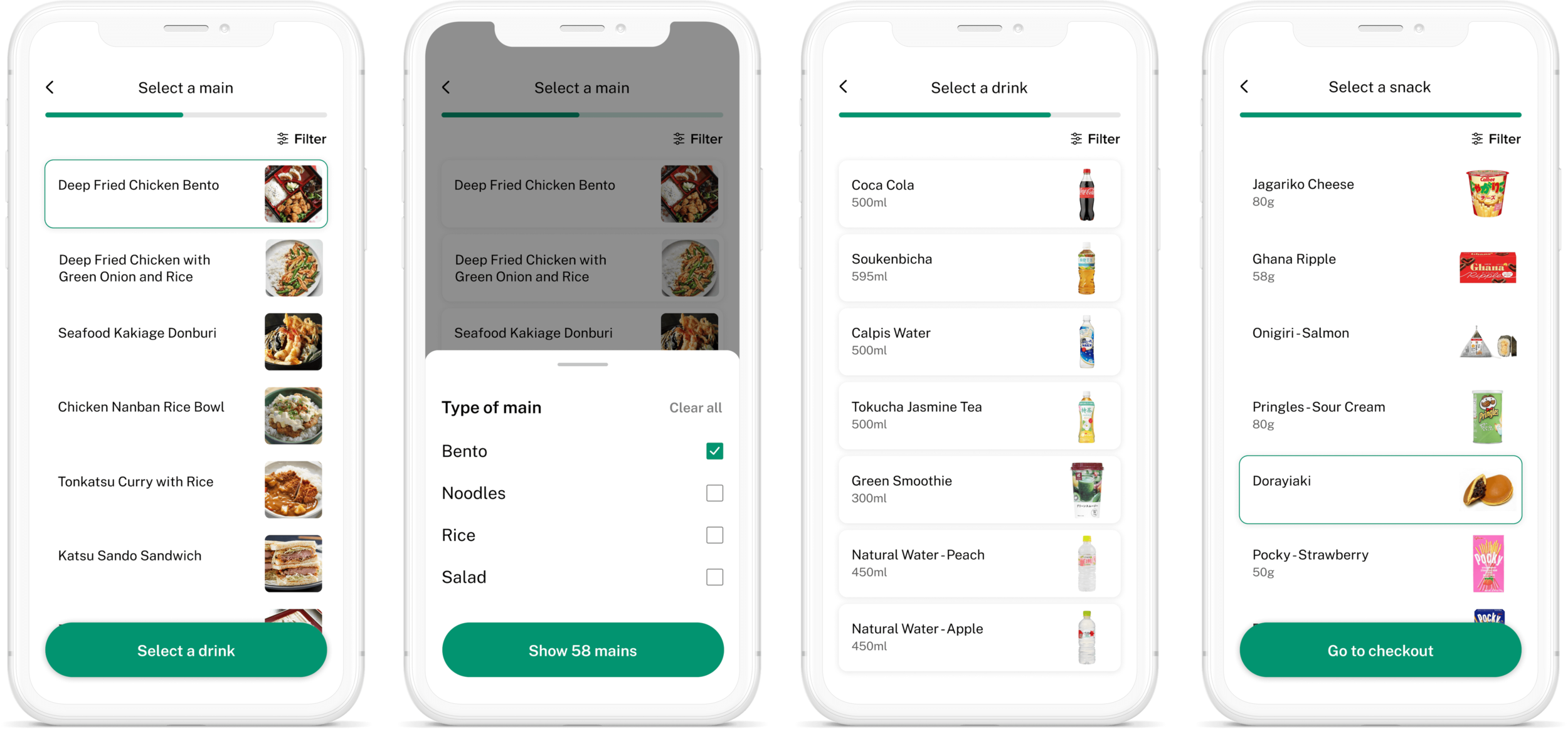
Meal selection flow
Checkout Flow
Up until the end of the checkout experience, customers have the option to change their order collection and swap items for others.
We also implemented a mockup payment system, enabling users to choose their preferred payment, with the option to add new fake cards to their account. Using a mockup feature helped us learn more about what Japanese customers expect of a payment feature and what most popular Japanese payment options would have to be included at a later stage.
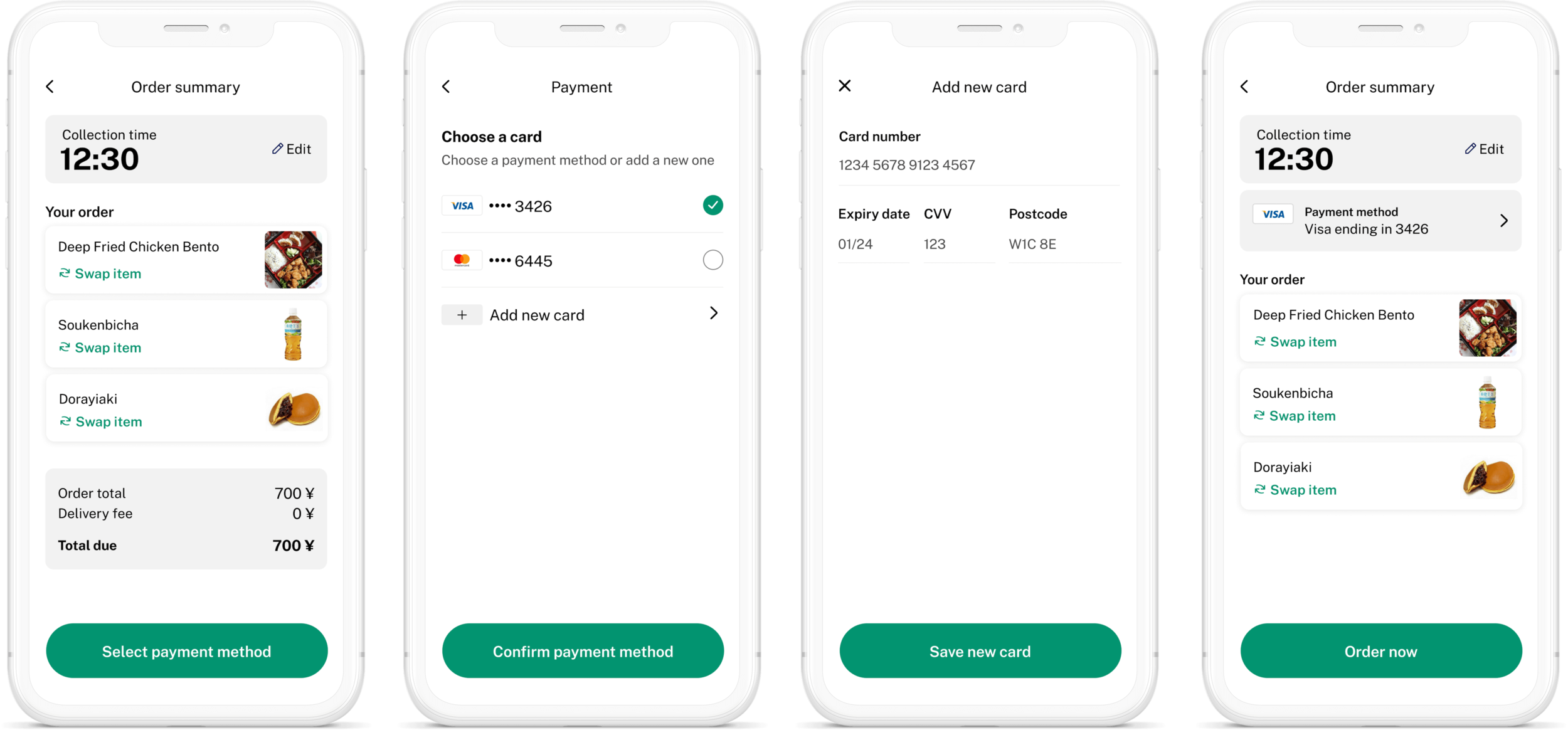
Checkout flow
Tracking Orders
Once an order has been placed through the app, it becomes essential for customers to be able to track the order status and for the app to provide order tracking at the right time in the experience.
The order tracking feature is dynamic and prioritise certain bits of information at specific times in the flow.
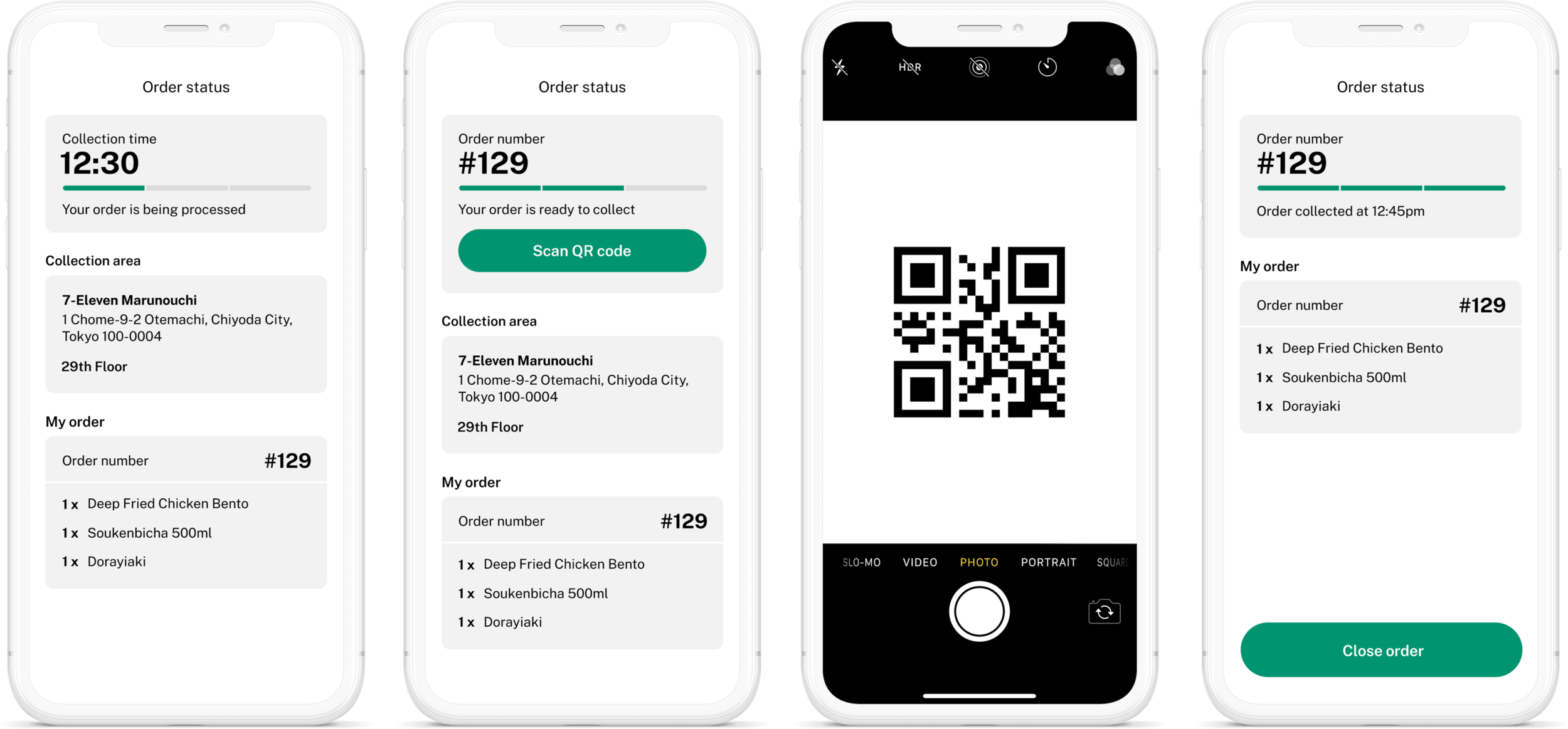
I designed the status flow to have three main stages:
Order is being processed: collection time is the primary information at this stage and it’s displayed in bold at the top of the screen.
Order is ready to collect: customer receives a notification as soon as their order is ready to collect in store. Clicking on the notification reopens the app. At this stage, the primary information becomes the order number as they will have to retrieve their order using that unique number. Once the order is located, they can scan the order QR code on the receipt, directly from the app.
Order is collected: the customer has collected their order and there isn’t any more action required on their side.
Project Outcomes
The proposition offered clear benefits for both customers and franchisees, was operationally feasible, and had the design and product fit required for large-scale rollout.
Beyond reducing queues and increasing throughput and sales, the app enables personalised offers, informed by customer history and preferences, improving demand forecasting and product assortment.
Within 11 weeks, 7-Eleven Japan gained clarity on how to advance a proposition that boosts store efficiency, increases revenue, and helps franchisees better manage their workload.